

Key takeaways
- Best Overall: P3 Kill A Watt P4400 – the reference plug-in meter with a long track record and a documented spec sheet.
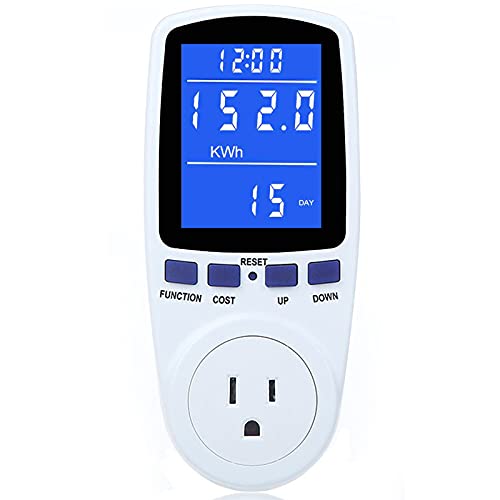
- Best Value: KETOTEK Watt Meter Power Meter Plug – a basic backlit display for a very low outlay.
- Best Budget: MECHEER Watt Meter Power Meter Plug – multiple display modes and a simple one-button interface.
- Best Premium Plug-In: Gardner Bender PM3000 Energy Power Meter Monitor – a familiar hardware-brand meter with an LCD kWh readout.
- Best for Long-Term Tracking: Kasa Smart Plug Mini with Energy Monitoring (KP115) – app-based history with scheduling.
- Best for a Multi-Plug Setup: Tapo Smart Plug P115 – sold in multi-packs so several appliances can be watched at once.
The best power usage meter for most kitchens is the P3 Kill A Watt P4400, because it reads watts, kilowatt-hours, voltage, amps, and power factor on a plain plug-in display with no app, no account, and no Wi-Fi to configure. The runner-up is the Kasa Smart Plug Mini with Energy Monitoring (KP115) for anyone who would rather watch an appliance’s draw from a phone and leave the meter in place for weeks. If you are shopping for an electricity usage meter or a power consumption meter to find out what your air fryer, fridge, coffee maker, and toaster oven really cost to run, this guide sorts six plug-in options by how they behave in a kitchen, not just by what the box says.
Kitchens are the most interesting place to put a meter. The refrigerator cycles on and off all day, a kettle pulls close to the limit of a standard outlet for three minutes, and a countertop appliance may sit in standby for twenty-three hours. A meter tells you which of those habits actually shows up on the bill. This guide is research-based: we compared manufacturer spec sheets, listing details, and independent coverage, and we did not personally use these products. Anything we could not confirm is marked “not listed.”
Our top picks


As an Amazon Associate we earn from qualifying purchases at no extra cost to you.
Top Picks at a Glance
- Best Overall: P3 Kill A Watt P4400 – the reference plug-in meter with a long track record and a documented spec sheet.
- Best Value: KETOTEK Watt Meter Power Meter Plug – a basic backlit display for a very low outlay.
- Best Budget: MECHEER Watt Meter Power Meter Plug – multiple display modes and a simple one-button interface.
- Best Premium Plug-In: Gardner Bender PM3000 Energy Power Meter Monitor – a familiar hardware-brand meter with an LCD kWh readout.
- Best for Long-Term Tracking: Kasa Smart Plug Mini with Energy Monitoring (KP115) – app-based history with scheduling.
- Best for a Multi-Plug Setup: Tapo Smart Plug P115 – sold in multi-packs so several appliances can be watched at once.
Comparison Table
| Product | Best for | Key specs | Watch for | Price tier |
|---|---|---|---|---|
| P3 Kill A Watt P4400 | Accurate spot checks and week-long runs | 115 VAC, 15 A max, 1875 VA max; reads kWh, W, VA, V, A, Hz, power factor | No app or logging; counters reset when unplugged | Mid-range |
| KETOTEK Watt Meter Plug | Cheap, simple kitchen checks | LCD with backlight; kWh readout per listing | Accuracy rating not listed | Budget |
| MECHEER Watt Meter Plug | Multi-mode readouts on a small budget | 7 display modes per listing; voltage, amps, kWh | Accuracy rating not listed | Budget |
| Gardner Bender PM3000 | Shoppers who want a hardware-brand meter | LCD plug-in kWh monitor for appliance cost tracking | Maximum load rating not listed in the title | Mid-range |
| Kasa Smart Plug Mini (KP115) | Phone history and remote shut-off | Wi-Fi, energy monitoring, works with Alexa and Google Home per listing | Needs an app and a Wi-Fi network | Mid-range |
| Tapo Smart Plug P115 | Watching several appliances | Wi-Fi, energy monitoring, 15 A, multi-pack options | Needs an app; plug limited to 15 A | Mid-range |
1. P3 Kill A Watt P4400: Best Overall
- Operating voltage 115 VAC, maximum 125 VAC, maximum current 15 A, maximum power 1875 VA, per the maker’s manual.
- Measures RMS voltage, RMS current, active power, apparent power, energy in kWh, line frequency, and power factor.
- Energy display runs from 0.01 to 9999 kWh; the display updates every second.
- Manual lists 0.5 percent accuracy for energy; weight about 5 oz.
- Standard NEMA 5-15 plug and receptacle for North American outlets.
Best for: anyone who wants one trusted meter to move between the fridge, the toaster oven, and the coffee maker. Skip if: you want a history graph or remote alerts; this meter shows instantaneous and cumulative values only and does not record time-stamped data.
The reason this model is still the default answer is the combination of a published spec sheet and a very plain workflow. You plug the meter into the wall, plug the appliance into the meter, and cycle through the display. For a refrigerator, leave it for a full week so the compressor cycles, the defrost heater, and a few door openings all show up in the kilowatt-hour total. Divide the total by the number of hours it ran and you have an honest average draw, which is more useful than any nameplate rating.
The power factor and apparent power readings matter more than they sound. Motor-driven kitchen appliances such as blenders, stand mixers, and refrigerators do not draw power in a simple resistive way, so watts and volt-amps differ. If you only look at amps times volts you will overestimate what you pay for. The meter shows both, so you can see the difference rather than guess.
One practical quirk: the kWh and elapsed-time counters accumulate from the moment power is applied, and the manual says briefly removing power resets them. That means a power flicker or an accidental unplug can wipe a multi-day measurement. Plug it into an outlet no one else is likely to use, and write down the reading each day.
Pros: documented ratings; full electrical readout; no app or account; simple and durable-feeling design. Cons: no data logging; counters reset on power loss; bulky enough to block the second outlet on some duplex receptacles.
2. KETOTEK Watt Meter Power Meter Plug: Best Value
- Plug-in meter with an LCD and a backlight, per the listing.
- Reads energy in kWh, along with voltage, current, and power.
- Marketed as a kilowatt meter socket outlet for home appliances.
- Accuracy rating: not listed.
- Maximum load: not listed in the title; check the label before plugging in a high-wattage appliance.
Best for: a first-time buyer who only wants to know which two or three kitchen appliances are worth a closer look. Skip if: you need a certified-accuracy figure or you intend to run space heaters or toasters at their full rating.
The backlight is the feature that makes a budget meter pleasant to use in a kitchen. Outlets are often under cabinets or behind appliances, and an unlit LCD is hard to read at that angle. With a backlit screen you can read the number without pulling the fridge out. The basic workflow is the same as with any plug-in meter: plug in, plug the appliance in, press the button to cycle between watts, kWh, voltage, and amps.
At this tier you are trading documentation for price. The listing does not publish an accuracy percentage, so treat the readings as good for comparison rather than for billing disputes. For the question most households actually have, such as whether the old chest freezer in the garage costs more to run than a new one, a small error does not change the conclusion. The difference between 40 watts and 120 watts is obvious on any meter.
Pros: low cost; backlit screen; easy to read. Cons: no published accuracy; load rating not listed; plastic housing feels lighter than premium meters.
3. MECHEER Watt Meter Power Meter Plug: Best Budget
- Plug-in meter with 7 display modes per the listing (a newer variant lists 8).
- Reads voltage, amps, watts, and kilowatt-hours.
- Available in single-pack and two-pack versions, one with a cord, per the listings.
- Accuracy rating: not listed.
- Maximum load: not listed in the title.
Best for: households that want two meters, one for the kitchen and one for the home office or garage. Skip if: you want published accuracy or a rugged design for a workshop.
The appeal of MECHEER is the multiple variants. A two-pack costs only slightly more than a single meter, and having two lets you compare the fridge and the freezer side by side over the same week. The version with a cord is easier to use behind appliances where the meter body would otherwise hit the wall.
The several display modes are the main usability point. Rather than a single screen that cycles, the meter lets you step through volts, amps, watts, and cumulative kWh. A good habit is to leave it on the kWh screen for long runs and only switch to watts for short checks like a kettle boil. Many cheap meters also include a cost-calculation mode where you enter your electricity rate; if yours has it, enter the rate from your bill and the display will convert usage to dollars.
Pros: very low entry cost; multi-pack and cord options; several readout modes. Cons: no accuracy figure; several near-identical variants can confuse; manual quality varies.
4. Gardner Bender PM3000: Best Premium Plug-In
- Plug-in energy power meter and monitor with an LCD, per the listing.
- Tracks kWh usage for appliance cost tracking.
- Made by a long-established electrical hardware brand now sold under the nVent name.
- Accuracy rating: not listed.
- Maximum load: not listed in the title.
Best for: people who prefer an electrical-supplies brand over an anonymous marketplace meter. Skip if: you want the broadest set of readings; confirm the exact parameters on the product page before you buy.
This is the pick for shoppers who value brand accountability. When a meter is part of a catalog from a company that also sells outlet checkers and electrical accessories, you are more likely to find a manual and support contact. It is aimed squarely at “how much does this appliance cost me” rather than electrical engineering, which is what most kitchen buyers want anyway.
Think of it as the middle road between the budget meters and the documented-spec Kill A Watt. If the Kill A Watt is out of stock or you prefer the form factor, this is a reasonable second choice. As with the others, look for the rated amperage on the label before connecting a high-draw appliance such as a toaster oven or a kettle.
Pros: established hardware brand; LCD kWh display; focused on appliance cost tracking. Cons: fewer published specs; no app; no data logging.
5. Kasa Smart Plug Mini with Energy Monitoring (KP115): Best for Long-Term Tracking
- Wi-Fi smart plug with energy monitoring, per the listing.
- Works with Alexa and Google Home per the listing; control through the Kasa app.
- Scheduling, countdown timers, and remote on/off.
- Rating: the newer Matter model lists 15 A / 1800 W maximum; for the KP115 confirm on the label.
- Check the manual for current Wi-Fi band requirements during setup.
Best for: a coffee maker, a slow cooker, or a countertop freezer you want to monitor for weeks without standing in front of it. Skip if: you do not want another app, or the outlet is outside your Wi-Fi range.
A smart plug flips the usual meter experience. Rather than walking to the outlet and pressing a button, you open the app and see a history of how much power the connected device used by day and month. It is the best way to see patterns, such as how much a coffee maker with a warming plate really adds to the bill when left on all morning. Scheduling also lets you cut power at night to an appliance that has no real off switch.
The trade-offs are the usual smart-home ones: you need a stable Wi-Fi connection, an account with the manufacturer’s app, and some patience at setup. Energy figures from smart plugs are also typically good for trends rather than lab accuracy. For high-wattage heating appliances, stay within the plug’s rated load, and do not use an app-controlled shut-off on any appliance that requires supervision.
Pros: history in an app; scheduling and remote control; works with common voice assistants. Cons: account and Wi-Fi required; limited to a 15 A outlet; cloud dependency for some features.
6. Tapo Smart Plug P115: Best for a Multi-Plug Setup
- Wi-Fi smart plug with energy monitoring, 15 A, per the listing.
- Works with Alexa, Google Home, and Samsung SmartThings per the listing.
- Sold as 2-packs and 4-packs.
- Time schedules and remote control through the Tapo app.
- A newer Matter-compatible variant (P110M) is also sold; confirm the model before purchase.
Best for: households that want to watch the fridge, the dishwasher, the microwave, and the coffee maker at the same time. Skip if: you only need a one-off spot check, since a plain meter is cheaper and simpler.
The reason to choose a multi-pack is comparison. One reading in isolation is hard to interpret; four readings across a week give you a ranking. You can see, for example, that the dishwasher uses most of its energy in a short heating burst while the fridge adds up slowly over the entire day. That ranking tells you where an efficiency upgrade will pay back and where it will not.
As with other smart plugs, keep the high-heat appliances on a supervised basis. A meter that reads is harmless; a plug that can switch on a heating element when you are not around is something you should think twice about. Use the energy graph, and leave the scheduling for lamps and low-risk devices.
Pros: multi-pack options; energy history in app; broad smart-home compatibility. Cons: app and account needed; plug size may block adjacent outlets; 15 A limit.
Also Consider
- Kill A Watt Connect P4498: a newer Kill A Watt with a two-piece housing and a 35-inch cord, which is easier to use behind a fridge. Check the product page for what it logs and how it connects.
- SURAIELEC Outlet Watt Meter: listed with a 90-250V wide range and a power cost calculator, which is handy if you want the meter to show cost rather than only kWh.
- Emporia Energy Monitoring Smart Plug: another Wi-Fi plug with energy readouts and Alexa and Google Home support per the listing.
- Refoss Smart Home Energy Monitor: a whole-panel monitor with circuit sensors rather than a plug-in meter. It suits someone who wants every circuit tracked, but installation should be handled by a qualified electrician.
How We Chose
We started with the long tail of plug-in energy monitors and narrowed the list by looking for the combination of a readable display, kWh totals, and an honest spec sheet. We read manufacturer manuals and product pages, compared listing details across variants, and checked independent explanations of how plug-in meters measure power. We did not personally use these products, so this guide makes no claims about long-term durability or measured accuracy beyond what the maker publishes.
We gave extra weight to three things. First, whether the maker published a maximum current and power rating, because kitchen appliances can approach the 15 A limit of a standard plug. Second, whether the meter shows cumulative kilowatt-hours, because that is the number that maps to your bill. Third, whether the product works without a phone, since many people want a tool they can leave in a drawer and pull out twice a year. Where a listing did not state a value, we wrote “not listed” rather than guessing.
Buying Guide
Check the load rating before you plug in anything hot
A standard North American outlet is a 15 A circuit, and the meter in between has to carry the same load. The Kill A Watt lists 15 A and 1875 VA. Many smart plugs list 15 A and 1800 W. A toaster oven, an air fryer, or an electric kettle can draw most of that. If a meter does not state its rating, assume the lower end and avoid the most powerful appliances in your kitchen. Never use a meter on a 240 V appliance unless the product is rated for that voltage.
Decide between a spot-check meter and a smart plug
A plain meter is the fastest way to find out what something draws right now, and the easiest way to measure a full week of fridge cycles if you leave it in place. A smart plug is better when you want history, schedules, or remote alerts. The cost is setup effort and a dependency on an app. If you only own one appliance you are curious about, start with a plain meter.
Look for kWh, not just watts
Watts tell you the draw at one moment. Kilowatt-hours tell you the total energy over time, which is what your utility bills. A refrigerator might read anywhere from near zero to a few hundred watts depending on whether the compressor is running, so one watt reading is almost meaningless. Choose a meter that accumulates kWh and elapsed time.
Do the cost arithmetic yourself
Take the kWh total, divide by hours to get average kW, and multiply by your rate. As an illustration only, suppose a meter shows 1.2 kWh over 24 hours for a fridge: that is 0.05 kW on average, or about 36 kWh a month. At an example rate of 17 cents per kWh, that works out to about $6 a month. Use the rate on your own bill, since rates differ widely by region and by time-of-use plan.
Think about standby draw
Many kitchen appliances such as microwaves, coffee machines, and smart displays keep a clock or screen alive all day. A meter reveals those small continuous draws. Even a few watts add up over a month, and it is the one area where switching off at the wall or using a power strip with a switch can make a real difference.
Mind the physical fit
Some meters are wide enough to cover both outlets of a duplex receptacle. A cord version, or a meter designed with a slimmer body, is easier to use behind a fridge. Also consider whether the display faces the right direction once plugged in: some are readable only when the outlet is horizontal.
Common Mistakes
- Reading a single watt value from a cycling appliance and extrapolating it to a month.
- Plugging a meter rated below the appliance’s draw into the outlet.
- Resetting the meter by accident during a multi-day run when moving the plug.
- Ignoring the ground pin or using a cheater adapter to fit a meter into a two-prong outlet.
- Assuming a smart plug’s energy graph has the precision of a lab instrument.
Frequently Asked Questions
What is a power usage meter and what does it measure?
It is a plug-in device that sits between an outlet and an appliance and shows how much electricity the appliance uses. Most show watts, volts, amps, and cumulative kilowatt-hours, and some also show power factor and cost.
Is an electricity usage meter the same as a power consumption meter?
Yes, for household purposes they are the same kind of product, sold under several names. Look at the specification list rather than the name to see what it measures.
How long should I leave the meter on a refrigerator?
At least 24 hours, and ideally a week. A fridge cycles on and off, and door openings and room temperature change the totals. A week gives you a better average than any short reading.
Can I use a plug-in meter on a stove, oven, or dryer?
No, not unless the product is explicitly rated for that outlet and voltage. Most plug-in meters are made for standard 120 V outlets. Large appliances on 240 V circuits need a different kind of monitor installed by a qualified electrician.
Are smart plug readings accurate enough?
For comparing appliances and finding energy hogs, usually yes. For billing-grade accuracy, look for a meter whose maker publishes an accuracy rating, as the Kill A Watt manual does.
Will a meter save me money by itself?
No. It only gives information. The savings come from acting on it, such as replacing an old freezer, unplugging idle appliances, or changing how often you run a high-draw device.
Can I leave a meter plugged in permanently?
Many people do, especially with smart plugs. Stay within the rated load, keep the plug away from water and steam, and follow the manufacturer’s guidance for continuous use.
Which One Should You Buy?
If you want one dependable meter and nothing else, pick the P3 Kill A Watt P4400. If you are watching your budget and only need a quick answer on a couple of appliances, the KETOTEK or MECHEER meters do that job. If you like a hardware-brand label, the Gardner Bender PM3000 is a sensible alternative. If you want long-running history in an app, choose the Kasa KP115 for a single device or a Tapo P115 multi-pack to watch several appliances at once. Whichever you choose, check the load rating first, leave the meter long enough to capture a full cycle, and compare your results against your utility bill.
Sources
- P3 International Kill A Watt P4400 operation manual and product page
- Kasa Smart product pages and setup guides (TP-Link)
- Tapo Smart Plug product pages (TP-Link)
- nVent Gardner Bender PM3000 product information
- U.S. Department of Energy guidance on estimating appliance energy use
- Manufacturer listing details for KETOTEK and MECHEER watt meters
Last updated: October 2026





Write Your Review
No reviews yet. Be the first to share your experience!