

Key takeaways
- Best Overall: P3 Kill A Watt P4400, the classic plug-in electricity usage monitor.
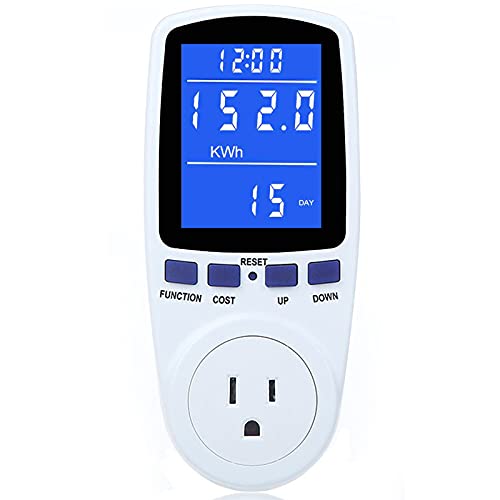
- Best Value: MECHEER Watt Meter Power Meter Plug with 7 display modes and backlight.
- Best Budget Feature Set: KETOTEK Watt Meter with overload alarms and a kWh alarm.
- Best Wide Voltage Range: SURAIELEC Outlet Watt Meter, 90 to 250 volts.
- Best for Two Small Appliances: Briidea Electricity Usage Monitor with two outlets (for loads under 1200 W each).
- Best Simple Alternative: P3 Kill A Watt EZ P4460 with utility rate entry and cost forecasts.
The best electricity consumption meter for kitchen appliances is the P3 Kill A Watt P4400 if you want the long-established name with a published accuracy figure and a 15 amp, 125 volt rating that covers most countertop appliances, and the MECHEER 7-mode watt meter if you want a cheap, backlit electricity consumption monitor with adjustable overload protection and a built-in cost calculator. Either one plugs between the wall and your refrigerator, air fryer, kettle or coffee maker and tells you watts, kilowatt-hours and an estimated running cost.
A plug-in electricity consumption monitor answers questions that a bill never will. How much does the second fridge in the garage really draw? Is the toaster oven costly to run compared with the air fryer? What does the coffee maker pull while it sits on its warming plate? This guide compares six real, currently sold meters and shows how to read them in a kitchen. We did not personally use these products. The comparison is research-based, built from manufacturer pages, retailer listings and the user manuals those listings link to, and we mark unconfirmed specs as not listed. Anything involving mains electricity deserves care, so read each device’s rating before you plug in a heating appliance.
Our top picks



As an Amazon Associate we earn from qualifying purchases at no extra cost to you.
Top Picks at a Glance
- Best Overall: P3 Kill A Watt P4400, the classic plug-in electricity usage monitor.
- Best Value: MECHEER Watt Meter Power Meter Plug with 7 display modes and backlight.
- Best Budget Feature Set: KETOTEK Watt Meter with overload alarms and a kWh alarm.
- Best Wide Voltage Range: SURAIELEC Outlet Watt Meter, 90 to 250 volts.
- Best for Two Small Appliances: Briidea Electricity Usage Monitor with two outlets (for loads under 1200 W each).
- Best Simple Alternative: P3 Kill A Watt EZ P4460 with utility rate entry and cost forecasts.
Quick Comparison Table
| Product | Best for | Key specs | Watch for | Price tier |
|---|---|---|---|---|
| P3 Kill A Watt P4400 | Dependable all-round readings | 115 VAC, up to 15 A, 1875 VA, 0.2% stated accuracy, shows V, A, W, kWh, Hz, VA, PF, time | Short 6 month warranty; one retailer lists it as discontinued | Mid-range |
| P3 Kill A Watt EZ P4460 | Cost forecasts with your rate | 115 VAC, 15 A, 1875 VA, utility rate entry, weekly to yearly cost forecast | No backlight confirmed | Mid-range |
| MECHEER 7-mode | Low-cost everyday monitoring | 15 A, 120 V, max 1800 W, backlit LCD, overload alert | Default overload set to 3680 W; lower it to 1800 W | Budget |
| KETOTEK KTEM02 (US) | Alarms and data memory | 0 to 1800 W, 15 A, kWh and cost alarms, keeps data when unplugged | Default overload 3680 W; adjust before use | Budget |
| SURAIELEC WMA02A | Wider voltage support | 90 to 250 V, 0 to 16 A, 0 to 3680 W, 11 values over 4 modes, 90 day memory | NEMA 5-15 plug only | Budget |
| Briidea 2-outlet | Two low-wattage appliances | 120 to 220 V input, each outlet 10 A and 1200 W, Class 1.0 | 1200 W per outlet is too low for many air fryers | Budget to mid-range |
1. P3 Kill A Watt P4400: Best Overall
- Electrical rating: 115 VAC operating, 125 VAC maximum, 15 A maximum, 1875 VA.
- Accuracy: stated at 0.2%.
- Readings: volts, amps, watts, kilowatt-hours, frequency, volt-amps, power factor and elapsed time.
- Energy range: 0.01 to 9999 kWh with cumulative time.
- Size and weight: about 5.1 x 2.4 x 1.6 in and 5 oz; ETL listed.
Best for: anyone who wants the standard reference meter and plans to check many appliances. Skip if: you want a backlit screen or a rechargeable memory battery.
The Kill A Watt has been the default recommendation for home electricity checks for years, and the P4400 is the model most people mean when they say the name. P3 states a 0.2% accuracy figure, which is tighter than most budget alternatives publish. The display cycles through eight measurements, but the two you will use most are watts, for instantaneous draw, and kWh, for total energy over time. Leave it connected to the refrigerator for a few days and the kWh reading, divided by the elapsed hours, tells you the true average draw, including the compressor cycles.
Know its limits. It is rated for standard 115 volt appliances at up to 15 amps. That fits a refrigerator, a microwave, a countertop air fryer or a coffee maker, but it will not handle 20 amp loads or 240 volt equipment like a range or a dryer. The warranty is stated as six months, which is short, and one retailer lists the P4400 as discontinued, so check availability and the exact version before you buy. For a kitchen it is the benchmark: simple, accurate and long documented.
Pros: stated 0.2% accuracy; eight readings; ETL listed; compact; decades of documentation. Cons: no backlight confirmed; short warranty; 115 V and 15 A only.
2. MECHEER 7-Mode Watt Meter: Best Value
- Rating: 15 A, 120 V, maximum 1800 W.
- Readings: power, energy, volts, amps, hertz, power factor, cost, minimum and maximum power, cumulative days and time.
- Display: backlit LCD with adjustable backlight time from 10 minutes to always on.
- Overload: default threshold 3680 W, adjustable from 0 to 3680 W; the maker advises setting it to 1800 W.
- Weight: roughly 227 to 283 g depending on the listing.
Best for: buyers who want a feature-rich electricity consumption monitor at a very low price and do not mind a little setup. Skip if: you want a published accuracy figure for the 7-mode model.
The MECHEER makes a good case for the budget category. It displays seven screens of data, including the running cost and the minimum and maximum power it has seen, which is useful for appliances whose draw spikes, like a toaster oven heating up or a blender starting. The backlight is a real convenience if your outlet sits behind the counter or in a dim pantry. The single piece of setup that matters is the overload threshold. The factory default is 3680 W, which is above the unit’s 1800 W rating, and the manual and listing both recommend lowering it to 1800 W: hold the Function button, set the number, and save.
Display behavior is documented clearly in the manual. For example, “OVERLOAD” on the final screen does not mean there is a problem unless it flashes. A related 8-mode MECHEER model lists ±1% voltage accuracy and ±2% current and power accuracy; those figures are for that model, not the 7-mode one, so we do not attribute them to this meter. If you want two of them to monitor a fridge and a freezer at once, MECHEER also sells a two-pack.
Pros: backlit; seven display modes; adjustable overload; cost calculation; low cost. Cons: default overload threshold above the rating; accuracy not published for this model; plastic housing feels lightweight.
3. KETOTEK Watt Meter: Best Budget Feature Set
- Model: KTEM02-US for the US plug.
- Rating: 100 to 250 VAC, 15 A, 0 to 1800 W.
- Readings: power, kWh, voltage, frequency, current, CO2 estimate, power factor, minimum and maximum power, cost, cumulative time.
- Alarms: overload (default 3680 W), kWh alarm (0 to 9999 kWh) and a cost alarm.
- Memory: keeps consumption data when unplugged; weight about 6.7 oz.
Best for: people who like alarms and who want to set a usage budget, for example a kWh limit for a chest freezer. Skip if: you have a UK or EU outlet, since those versions have different ratings and some have no backlight.
KETOTEK’s meter is close in concept to the MECHEER, but it puts more weight on alarms. You can set an energy alarm that triggers when cumulative kWh passes a number you choose, and a cost alarm for the same purpose. That makes it useful for a project like “watch my second fridge for a month and see if it passes a number”. It also ignores very small loads: the cost calculation only starts when an appliance draws more than 2 watts, which matters when you are trying to measure standby draw from a coffee maker or a microwave clock.
The backlight stays on for 10 minutes by default and can be changed with a button combination in the manual. Remember the same warning as with the MECHEER: the default overload level is 3680 W and the manual says to set it to 1800 W before use. Note also that versions differ by region; the UK listing is rated 2900 W at 13 A and some variants list no backlight.
Pros: energy and cost alarms; keeps data when unplugged; many readings including CO2; low cost. Cons: default overload threshold needs lowering; regional versions differ; 2 W threshold ignores very low standby loads.
4. SURAIELEC Outlet Watt Meter: Best Wide Voltage Range
- Model: WMA02A, 90 to 250 VAC.
- Range: 0 to 16 A and 0 to 3680 W; Class 1.0 accuracy.
- Display: large backlit LCD showing 11 values over 4 modes.
- Memory: built-in rechargeable battery keeps data for 90 days.
- Fit: NEMA 5-15P plugs and 5-15R outlets; not for AC or solar inverters.
Best for: households or travelers who use both 120 V and 240 V appliances. Skip if: you need a hardwired or high-current monitor.
This is the meter to look at if your kitchen has a 240 V small appliance or you move between countries. The 90 to 250 volt range covers both systems, and the 3680 W ceiling, 16 amps at 230 V, is double what the 120 V meters can handle in raw watts. It also stores data for 90 days using a small rechargeable cell, so you can unplug it from the wall, move it, and read the total later. The automatic cost calculator uses the electricity price you set.
The plug fit is the catch. The device uses NEMA 5-15 prongs, so other plugs need an adapter. An older SURAIELEC model is dual-voltage but with a fixed overload at 3680 W and a label listing only the lower range for certification reasons. Make sure you buy the 90 to 250 V version if you need both ranges.
Pros: wide voltage range; 11 values; 90 day battery memory; large backlit display. Cons: NEMA 5-15 only; label and range variations between models; no published tolerance for 120 V loads beyond Class 1.0.
5. Briidea Two-Outlet Electricity Usage Monitor: Best for Two Small Appliances
- Input: 120 to 220 V at 50 or 60 Hz.
- Rating: each of two outlets maximum 10 A and 1200 W.
- Accuracy: Class 1.0; resolution 0.01 W, 0.001 A and 0.01 V; tests above 0.20 W.
- Readings: power, volts, amps, hertz, kWh, cumulative time and power factor.
- Cord and memory: 14 AWG extension cord; power-off memory keeps data.
Best for: a coffee machine and a grinder, or two small appliances on one counter. Skip if: you want to monitor an air fryer, toaster oven or kettle.
The Briidea has the fresh idea of putting two outlets on one meter, so you can plug in a device and its accessory and see their combined consumption. It also reads very low loads above 0.2 W, which is useful for measuring standby draw. The warning that matters is the rating: each outlet is capped at 1200 W, and a warning sounds above that level. Many air fryers and toaster ovens draw 1500 to 1800 W, so they exceed the limit. Use it only for devices you have checked.
The extension cord is thick, 14 AWG, which is a reassuring detail, and the memory function means you do not lose readings after a power blip. It is a cord-style meter rather than a plug-in block, so it sits on the floor or counter rather than hanging from the outlet. A four-outlet model also exists but we have not compared its details here.
Pros: two outlets; reads low standby loads; heavy-duty cord; power-off memory. Cons: 1200 W per outlet limit; more cluttered on a counter; not suited to heating appliances.
6. P3 Kill A Watt EZ P4460: Best Simple Alternative
- Rating: 115 VAC, 15 A, 1875 VA; 47 to 63 Hz.
- Accuracy: typical figures of ±0.2% for voltage, ±0.3% current and ±0.5% for power and kWh per the maker’s documentation.
- Cost features: enter your utility rate and view cost forecasts by week, month and year.
- Memory: built-in battery backup.
- Backlight: not confirmed in the sources we checked.
Best for: people who mostly want to know “what will this cost me per month” and prefer a straightforward interface. Skip if: you want a lit display.
The EZ version keeps the Kill A Watt core and adds a user-friendly cost view. Instead of reading kWh and doing the maths, you enter your electricity rate and the device projects running cost over a week, a month and a year. That fits the way most readers think about it: they want to know whether an old chest freezer is worth keeping. The built-in battery backup holds data if the power drops. Reviewers note that the screen blinks when the current exceeds 15 amps, which tells you the load is too large for the meter.
Because the specs and approach are similar to the P4400, the choice between them is about convenience. The P4400 gives the more complete set of measurements; the EZ gives an easier cost view. Neither replaces a panel monitor for the whole house, but both are excellent for single appliances.
Pros: rate entry and forecasts; battery backup; same trusted maker; stated accuracy. Cons: no confirmed backlight; same 15 A limit; fewer extra readings than some rivals.
Worked Example: What Does a Kitchen Appliance Really Cost to Run?
Energy cost is watts times hours divided by 1000, times your rate per kilowatt-hour. Assume an example rate of 17 cents per kWh; your own rate will differ. A refrigerator that averages 120 watts over a full day uses 120 x 24 / 1000 = 2.88 kWh, or about 49 cents a day. An air fryer drawing 1500 W for 20 minutes uses 1500 x 0.33 / 1000, about 0.5 kWh, roughly 8.5 cents per use. A coffee maker on a warming plate at 75 W for two hours adds 0.15 kWh. These numbers are illustrations, not measurements of any particular product, but they show why leaving a meter on the refrigerator for 24 to 72 hours is more informative than a quick reading: compressors cycle on and off.
Also Consider
- HBN Watt Meter Plug with Backlight: a very low-cost backlit plug-in meter; specs beyond the title are not listed.
- TEKCOPLUS Digital Power Meter: a plug-in unit with LCD backlight and energy, voltage and frequency readings.
- MECHEER 2-Pack Watt Meter: two of the 7-mode meters, handy for monitoring a fridge and a freezer together.
- Kill A Watt Connect P4498: the newer connected version of the Kill A Watt; check the maker’s page for its feature list.
How We Chose
This guide is research-based. We compared manufacturer pages, user manuals, retailer listings and independent write-ups, and we did not personally use these products. We chose plug-in meters sold now that handle standard North American kitchen outlets, covering a classic reference model, two cost-focused budget meters, a wide voltage model and a two-outlet design. We prioritized published ratings, overload handling, display features and how each meter helps you work out running cost. Where a spec could not be confirmed, we marked it as not listed. We avoided the claim that any meter is certified for your appliance; you should always check the appliance’s wattage against the meter’s rating.
Buying Guide
Match the rating to the appliance
The most important number is the maximum load. A 15 A, 120 V meter handles 1800 W continuously. A coffee maker or air fryer is typically under that, but many toaster ovens and kettles are at or near 1800 W. If an appliance label says 1500 W or more, avoid meters with a 1200 W limit such as the Briidea, and make sure the meter’s overload warning is set to the right level.
Accuracy and resolution
Published accuracy of 0.2% to 1% is more than enough for household budgeting. Resolution matters for low loads: a meter that reads from 0.2 W will show standby draw, while one that ignores loads under 2 W will not.
Display and cost features
A backlit LCD helps when an outlet is hard to see. Cost calculators work best when you can enter your rate. Alarms and maximum or minimum power readings help you catch spikes.
Memory and portability
Some meters keep data when unplugged, using a battery or non-volatile memory. That lets you plug the meter in at the wall, move it, and read results later. This is useful for tracking a fridge for several days.
Safety basics
Use meters that carry a recognized safety listing where possible, such as ETL on the Kill A Watt. Do not use them with appliances beyond their rating, do not use them on damaged outlets, and keep them dry. For permanent monitoring of a whole panel, speak to a qualified electrician.
Common Mistakes to Avoid
- Leaving the overload threshold at the factory 3680 W default on a 1800 W meter.
- Measuring a refrigerator for five minutes instead of 24 hours or more.
- Plugging a 240 V appliance into a 120 V-only meter.
- Using a two-outlet meter with a 1200 W limit for a high-wattage appliance.
- Forgetting to enter your own electricity rate, so the cost figures are meaningless.
Frequently Asked Questions
What is an electricity consumption meter?
It is a plug-in device that sits between an outlet and an appliance and displays power in watts, energy in kilowatt-hours, and often voltage, current and cost. It is also called an electricity usage monitor or watt meter.
Can I use a plug-in meter on a refrigerator?
Yes, as long as the meter’s rating exceeds the fridge’s draw, which is usually the case for 120 V home refrigerators. Leave it connected for at least 24 hours so it captures the compressor cycles.
Why does the manual say to change the overload setting?
Several budget meters ship with a 3680 W overload default, which is above their 1800 W rating. The manuals recommend lowering it to 1800 W so the alarm triggers at a safe level.
Will it work with an air fryer?
Most 15 A meters can, if the air fryer is under 1800 W. Check the label. Avoid the Briidea two-outlet monitor for air fryers because each outlet is limited to 1200 W.
How accurate are these meters?
The Kill A Watt states 0.2% accuracy, and others list Class 1.0 or percentages of 1% to 2%. That is accurate enough for household decisions, but it is not a calibrated lab instrument.
Can the meter measure standby power?
Some can. The Briidea reads above 0.2 W, while KETOTEK ignores cost calculation below 2 W. Check the minimum reading if standby draw is your goal.
Is it safe to leave a meter plugged in all day?
Meters are designed for continuous use within their rating, but you should follow the manual, check regularly for heat, and unplug the unit if anything looks damaged.
Which One Should You Buy?
Buy the P3 Kill A Watt P4400 if you want the reference meter with the most complete readings. Choose the MECHEER for a backlit, low-cost electricity consumption monitor, the KETOTEK if you like alarms and data memory, the SURAIELEC if you need 240 V support, the Briidea for low-wattage pairs, and the Kill A Watt EZ for easy cost forecasts. Whichever you select, check the appliance wattage, set the overload level to the meter’s real rating, and run the test long enough to see a full cycle.
Sources
- P3 International Kill A Watt P4400 and P4460 product pages and manuals
- MECHEER watt meter user manuals
- KETOTEK KTEM02 user manual
- SURAIELEC watt meter product pages
- Briidea electricity usage monitor product pages
Last updated: October 2026







Write Your Review
No reviews yet. Be the first to share your experience!