

Key takeaways
- Bright multipurpose living room: Hisense PX3-Pro. Its triple-laser light source and high brightness are suited to daytime viewing, while its gaming features make it more versatile than many home-cinema UST models.
- The shortest installation distance: Epson EpiqVision Ultra LS800. It can produce a large image from exceptionally close to the wall, which is useful on shallow media consoles.
- Movies, color, and integrated audio: BenQ V5000i. It combines 4K-class pixel shifting, a wide color gamut, and a substantial built-in 2.1-channel sound system.
- Large-screen living-room entertainment: Hisense L9Q. Its very high brightness and supplied screen options make it a strong choice when a bare wall is not flat or reflective enough.
- Premium conventional UST setup: Samsung The Premiere LSP9T. It remains an attractive all-in-one option when a polished smart-TV-style interface and integrated speakers matter more than the lowest input lag.
The best ultra short throw projectors for 2026 are the Hisense PX3-Pro for a bright, gaming-friendly living room, the Epson EpiqVision Ultra LS800 for minimal wall clearance, and the BenQ V5000i for accurate color and built-in sound in a dedicated movie space.
Ultra short throw (UST) projectors sit just inches from the wall rather than several feet behind the sofa. That makes them practical in rooms where a conventional projector would cast shadows, require ceiling installation, or compete with a ceiling light. The right choice depends less on headline resolution than on five measurements: brightness, throw distance, useful image-size range, ambient-light handling, and gaming latency.
Our top picks

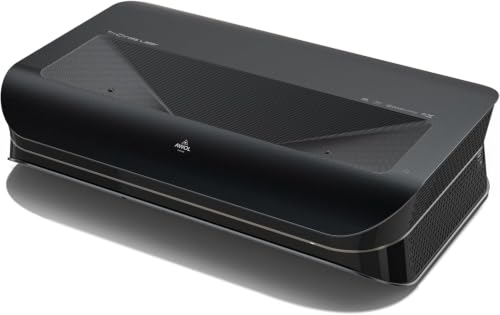

![Portable Smart Projector [Bundled with Google TV Stick 14.0 & 4K Support & Dolby] with WiFi and Bluetooth HDR10,Ceiling Mini Movie Short Throw Projector Outdoor Auto Focus for Home Theater Bedroom](https://m.media-amazon.com/images/I/51NiI6zAPpL._SL500_.jpg)
As an Amazon Associate we earn from qualifying purchases at no extra cost to you. Ratings are shown as listed on Amazon.
Quick picks by room and priority
- Bright multipurpose living room: Hisense PX3-Pro. Its triple-laser light source and high brightness are suited to daytime viewing, while its gaming features make it more versatile than many home-cinema UST models.
- The shortest installation distance: Epson EpiqVision Ultra LS800. It can produce a large image from exceptionally close to the wall, which is useful on shallow media consoles.
- Movies, color, and integrated audio: BenQ V5000i. It combines 4K-class pixel shifting, a wide color gamut, and a substantial built-in 2.1-channel sound system.
- Large-screen living-room entertainment: Hisense L9Q. Its very high brightness and supplied screen options make it a strong choice when a bare wall is not flat or reflective enough.
- Premium conventional UST setup: Samsung The Premiere LSP9T. It remains an attractive all-in-one option when a polished smart-TV-style interface and integrated speakers matter more than the lowest input lag.
UST projector comparison
| Model | Light source and rated brightness | Typical image range | Approximate throw ratio | Gaming and audio notes | Best room match |
|---|---|---|---|---|---|
| Hisense PX3-Pro | Triple laser; about 3,000 ANSI lumens | 80–150 inches | About 0.22 | 4K input support, gaming modes, integrated speakers | Bright living room and mixed use |
| Epson EpiqVision Ultra LS800 | Laser; about 4,000 lumens | 80–150 inches | About 0.16 | Low-latency gaming mode; Yamaha-designed 2.1 audio | Shallow console or bright family room |
| BenQ V5000i | RGB laser; about 2,500 ANSI lumens | 70–120 inches | About 0.25 | Low-input-lag mode; 40-watt 2.1-channel audio | Movie-focused room with controlled light |
| Hisense L9Q | Triple laser; up to about 5,000 ANSI lumens | 100–150 inches, depending on configuration | About 0.25 | Large-screen focus; integrated audio | Large, bright room needing a supplied screen |
| Samsung The Premiere LSP9T | Triple laser; about 2,800 ANSI lumens | 90–130 inches | About 0.19 | Game mode; built-in 40-watt 4.2-channel audio | Living-room replacement for a very large TV |
Brightness figures are manufacturer ratings and are not perfectly comparable between brands. A projector rated at 2,500 ANSI lumens can look more convincing than a brighter model if it is paired with a suitable ambient-light-rejecting screen, placed accurately, and viewed with nearby lights turned down.
How to match the projector to your room
Small room or shallow media cabinet
Measure from the wall to the front edge of the cabinet, not merely to the projector’s rear panel. UST models commonly need roughly 10 to 20 inches from the image wall to the back of the chassis, depending on the desired screen size and ventilation clearance. The LS800 is particularly useful when the cabinet is shallow because its approximate 0.16 throw ratio needs less depth than most competitors.
Do not assume that a 100-inch picture will fit simply because the projector is physically close. A 100-inch 16:9 image is about 87 inches wide and 49 inches high. Add space for the projector body, cable bends, and ventilation. A low cabinet that is only 12 inches deep may still be unsuitable.
Bright room with windows or open-plan lighting
Choose roughly 2,800 ANSI lumens or more for a large daytime image, then prioritize a fixed-frame ambient-light-rejecting screen. A plain white wall scatters light from the projector and room in every direction; an ALR screen is designed to send more projected light toward viewers while rejecting some light from above or the sides.
For a 120-inch image, the L9Q is the most brightness-oriented option in this group. The PX3-Pro and LS800 are more balanced choices for rooms that are bright during the day but can be dimmed for films. No UST projector completely defeats direct sunlight striking the screen, so curtains still produce a larger improvement than upgrading from one good projector to another.
Movie room with controlled lighting
Color, black-level performance, and screen quality become more important once the room is dark. The BenQ V5000i is appealing here because its RGB-laser design targets a wide color gamut and its integrated 2.1-channel audio is more substantial than the small speaker systems found in many compact projectors. For the best contrast, use a screen designed for UST projection rather than a standard long-throw ALR screen.
Gaming and sports
Check input lag in the exact picture mode you plan to use. Cinema modes often add processing, while game modes reduce it. UST projectors are generally less responsive than a dedicated gaming monitor or television, but models such as the PX3-Pro, LS800, and V5000i offer gaming modes intended to reduce delay.
For competitive shooters, racing, and rhythm games, look for a published figure around 20 milliseconds or lower at the intended resolution and refresh rate. For console adventure games, local multiplayer, and sports, a somewhat higher delay may be acceptable. Also verify HDMI bandwidth: “4K support” does not necessarily mean 4K at 120 Hz.
Installation details that prevent a crooked picture
- Use a rigid, level surface. A small tilt changes the geometry of a large image dramatically.
- Center the lens path on the screen. UST projectors have limited tolerance for horizontal offset. Avoid placing one at an angle and correcting everything digitally.
- Set the screen height before fine adjustment. Moving the projector forward or backward changes image size; raising or lowering it changes the vertical alignment.
- Use optical or physical alignment first. Digital keystone correction can make the image fit, but it discards pixels and can soften detail.
- Connect external devices after alignment. Leave room for HDMI cables, streaming boxes, game consoles, and power ventilation.
- Disable automatic picture changes where possible. Light sensors and adaptive modes can alter brightness or color between scenes.
A useful sizing calculation is to compare the screen width with the projector’s throw ratio. A 100-inch 16:9 screen is approximately 87 inches wide. With a 0.22 throw ratio, the lens-to-screen optical distance is about 19 inches; with a 0.16 ratio, it is about 14 inches. These are approximate optical distances, not the total cabinet depth or the clearance required around the chassis.
Built-in audio: when it is enough
Integrated sound is a major reason to choose a UST projector over a conventional projector. The LS800, V5000i, and LSP9T can provide usable dialogue and casual viewing without a separate soundbar. That is convenient in an apartment, bedroom, or kitchen-adjacent family room where a full surround system is impractical.
Built-in speakers still cannot create the same bass, separation, and placement as a separate soundbar or AV system. If you plan to use external audio, check HDMI eARC or optical output before buying. Also allow space for the soundbar: placing one directly in front of a UST projector can block the lower part of the image or interfere with its light path.
Ownership realities: what wears first
Laser projectors avoid lamp replacement, but they are not maintenance-free. Dust on the intake filter or ventilation openings can raise operating temperatures and shorten component life. Inspect vents every few months, especially in homes with pets, cooking fumes, or open windows, and clean them with the method specified in the manual. Do not spray household cleaner into the projector.
The most common long-term problem is not the laser engine; it is alignment. A projector moved a few millimeters, a cabinet that settles, or a screen installed slightly out of level can make the image look uneven. Mark the projector’s foot positions after installation and avoid using it as a surface for objects. Keep the lens area free of fingerprints, and never cover the ventilation openings during extended viewing.
Plan for the screen as part of the purchase. A mediocre wall can make a high-end projector look washed out, while a proper UST screen can improve perceived contrast and uniformity more than a modest brightness upgrade. General market pricing is commonly about $2,000–$4,000 for the projector in this class, with compatible fixed-frame or motorized UST screens often adding roughly $500–$2,000 or more.
Final recommendation
Choose the Hisense PX3-Pro if one projector must handle films, television, daytime viewing, and gaming. Choose the Epson LS800 when cabinet depth is the limiting factor or the room stays bright. Choose the BenQ V5000i for a controlled-light movie room where color and built-in audio matter most. Move up to the Hisense L9Q when you need a very bright 100- to 150-inch image, preferably with its matched screen. The Samsung LSP9T remains a sensible polished living-room package, particularly for buyers who value its smart-TV experience and strong integrated speaker system more than the lowest possible gaming latency.








Write Your Review
No reviews yet. Be the first to share your experience!